


Learn Delem DA-53T parameter backup using the Backup/restore menu. Save machine parameters, tables, and settings safely to USB for future recovery.
Introduction
Performing a proper Delem DA-53T parameter backup is essential for protecting important press brake data and ensuring reliable system maintenance. During daily operation, the controller stores machine-related settings and other information that may be needed for troubleshooting, controller replacement, or system recovery.
Without a reliable backup, restoring the original machine configuration can become complicated and time-consuming. Understanding the different backup options is therefore an important part of maintaining a CNC press brake.
This guide explains the complete Delem DA-53T parameter backup procedure, including accessing the Backup/restore interface, understanding different backup categories, and exporting important data to a USB flash drive. By following the correct procedure, operators can protect valuable system information and prepare for future maintenance.
What Is Delem DA-53T Parameter Backup?
Delem DA-53T parameter backup is the process of saving important controller data to an external storage device for future maintenance, troubleshooting, or system recovery. The DA-53T controller provides a Backup/restore function that allows operators to export supported data through the system interface.
During the Delem DA-53T parameter backup process, operators can select different backup categories according to their maintenance requirements. These categories may include general controller data, tables and settings, and machine-specific parameters, depending on the system configuration.
Understanding the differences between these categories is essential for completing a reliable Delem DA-53T parameter backup. Since the All option does not necessarily include machine-specific parameters, operators should ensure that these parameters are backed up separately when required.
Before You Start
Before performing a Delem DA-53T parameter backup, prepare a USB flash drive and confirm that the controller is operating normally.
Make sure the USB drive can be recognized by the system and has sufficient available storage space. If the drive already contains important files, preserve them before proceeding.
It is also recommended to perform the backup when the machine is not processing a workpiece. Avoid interrupting the controller or disconnecting the USB drive during file transfer.
For machines that are operating correctly, creating a backup before changing important settings is particularly useful. This provides a reference point if technical adjustments are required later.
How to Perform Delem DA-53T Parameter Backup
Step 1: Open the Backup/Restore Interface
From the DA-53T controller, enter the Settings menu.
Locate and select Backup/restore to open the data management interface.
This page provides the available backup and restoration functions. Before selecting an option, review the categories displayed on the screen and determine which information needs to be saved.
The exact interface layout may vary depending on the controller software version.
Step 2: Understand the Backup Options
The backup interface includes several data categories that serve different purposes.
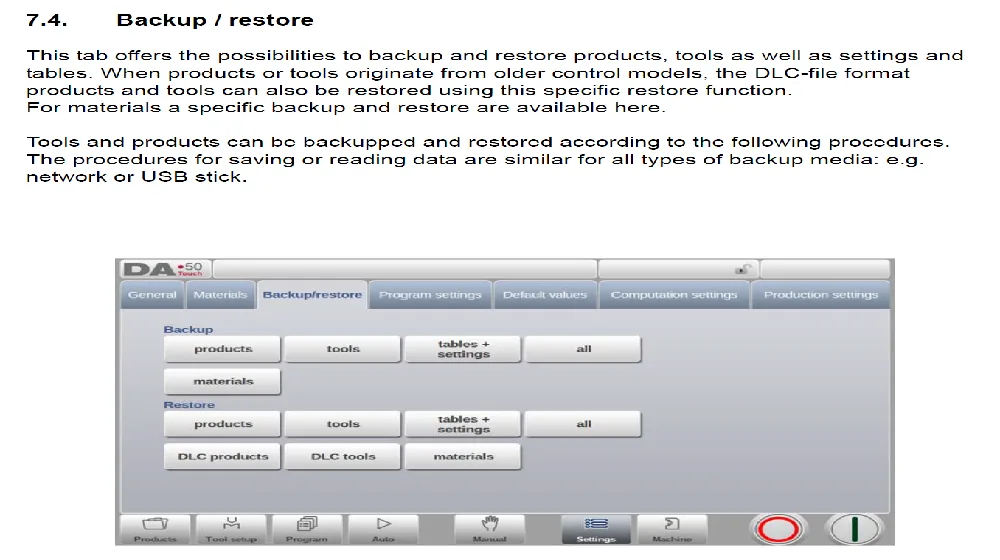
All
The All option is used to back up the data included within its defined backup scope.
However, selecting All should not automatically be interpreted as saving every underlying machine parameter. Operators should check the available categories and ensure that important machine-specific information is backed up separately when required.
Machine Parameters
Machine Parameters contains machine-specific configuration information relevant to the press brake control system.
These parameters may be important when performing technical maintenance, replacing a controller, or restoring the machine configuration.
For this reason, Machine Parameters should be backed up separately and stored carefully.
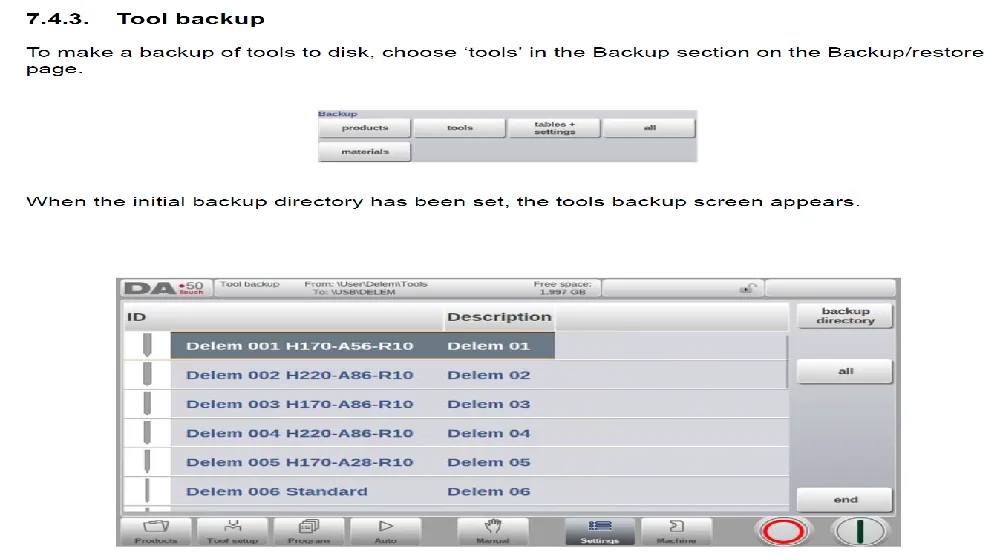
Tables + Settings
Tables + Settings is used to save the relevant table and setting data supported by this backup category.
This option should be distinguished from Machine Parameters because the two categories serve different purposes.
Keeping separate copies makes it easier to identify the required backup data during future maintenance.
Step 3: Back Up the Machine Parameters
Select Machine Parameters from the available backup categories.
Follow the controller instructions to export the corresponding data to the USB flash drive.
Wait until the backup operation has finished before removing the USB drive. If the controller displays a completion message, confirm that the operation has been completed successfully.
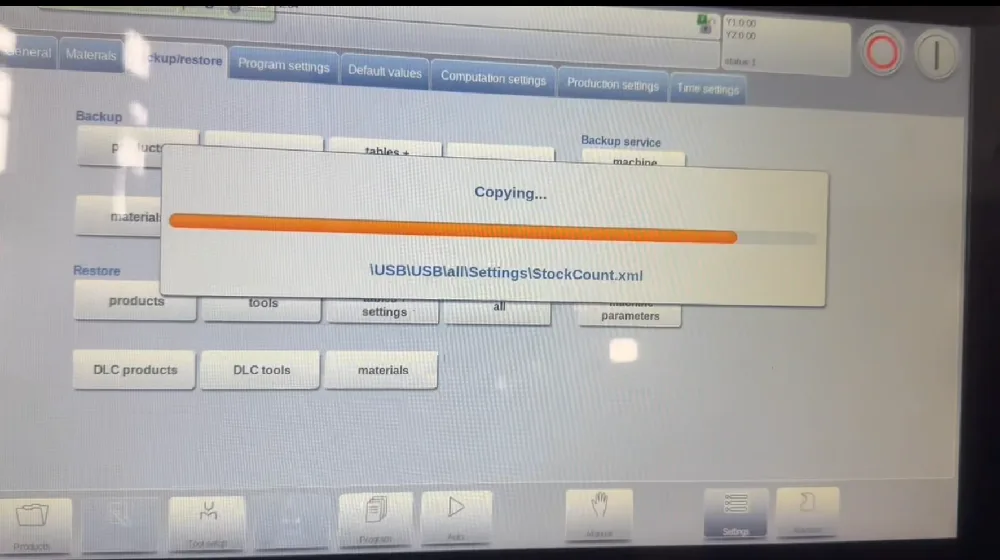
Because machine parameters may contain important configuration information, the exported backup should be preserved without unnecessary modification.
Do not edit the backup files manually unless instructed by qualified technical personnel.
Step 4: Back Up Other Required Data
After saving the machine parameters, return to the Backup/restore interface and select the additional data categories required for the machine.
Depending on the maintenance purpose, this may include All or Tables + Settings.
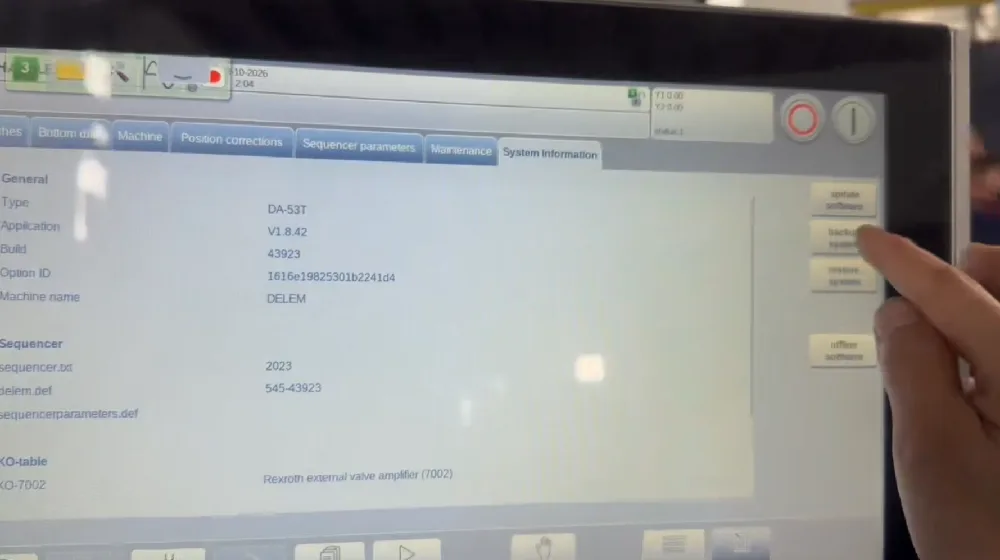
Complete the corresponding backup operations and save the exported files to the USB drive.
Keeping these categories separate helps prevent confusion between general controller data and machine-specific parameters.
Step 5: Verify and Store the Backup Files
After completing the required backup operations, confirm that the expected files have been saved to the USB flash drive.
Where possible, keep an additional copy on a computer or another secure storage device.
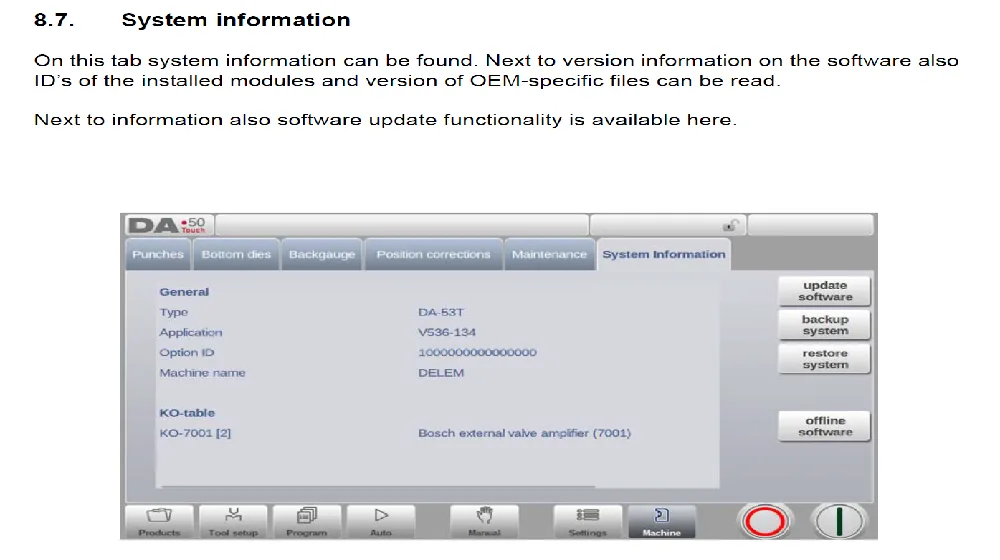
Organize the backup files using a clear folder structure that identifies the machine model, controller type, and backup date. Avoid changing the internal filenames or file structure if they are required by the controller for restoration.
A clearly organized backup archive can make future troubleshooting and data recovery more efficient.
Backup vs. Restore: What Is the Difference?
The Backup and Restore functions serve opposite purposes.
Backup exports supported data from the controller to an external storage device, allowing the information to be preserved for future use.
Restore imports previously saved data back into the controller.
Restoring data requires additional caution because imported settings may replace existing information or affect the machine configuration.
Before restoring machine parameters, confirm that the backup belongs to the correct machine and is compatible with the controller configuration.
Machine parameter restoration should be performed only with appropriate technical guidance, particularly after controller replacement or major maintenance.
Important Notes
Although the general procedure is similar across supported DA-53T configurations, the available backup options and interface layout may differ depending on the software version.
The All option should not be assumed to include every machine-specific parameter. When preparing a complete maintenance backup, save Machine Parameters separately when the controller provides that option.
Never restore parameter files from another press brake without confirming compatibility. Different machines may have different axis configurations, hydraulic systems, positioning settings, and other machine-specific requirements.
If the controller displays an error during backup or restoration, avoid making repeated changes without identifying the cause. Contact HARSLE technical support when assistance is required.
Tips for Better Backup Management
A reliable backup routine can reduce unnecessary downtime and simplify future maintenance.
- Create a backup when the machine is operating normally.
- Save machine parameters before major technical adjustments.
- Keep separate copies of different backup categories.
- Use clear folder names to identify the machine and backup date.
- Maintain an additional copy outside the USB flash drive.
- Avoid modifying exported backup files manually.
- Verify backup availability before replacing or repairing the controller.
These practices help ensure that important information remains accessible when technical support or system recovery is required.
Conclusion
Performing a regular Delem DA-53T parameter backup is an effective way to protect important controller data and simplify future maintenance. Understanding the differences between backup categories helps operators avoid overlooking essential information.
For reliable data protection, operators should save the required backup categories, preserve machine-specific parameters separately when applicable, and verify that the exported files are stored correctly.
By following this Delem DA-53T parameter backup guide, operators can establish a more organized backup routine, reduce the risk of data loss, and improve the efficiency of future troubleshooting and system recovery.
For machine-specific backup procedures or parameter restoration, always refer to the applicable Delem documentation or contact HARSLE technical support.


