


ESA S875 saving programmes is the built-in process used to store bending programs and parameter settings within the ESA S875 press brake controller. If you are wondering what the ESA S875 saving programmes process involves and how it ensures that your bending data is stored correctly, you are in the right place. In this article, I will explain how the ESA S875saving programmes function works, why saving programs properly is important for repeatable bending operations, and what steps operators should follow to ensure their program data is safely recorded and easy to retrieve for future production.
Understanding the ESA S875 Saving Programmes Process
The ESA S875 saving programmes function allows operators to store bending programs securely within the controller while maintaining compatibility with different software versions. As the ESA S875 controller software evolves, new functions are added. For example, after version 10.1, the number of available functions increased to 20, which changed the internal format of the work programmes.
Because of this update, newer program versions may not be fully compatible with older controller software. While version 10.x controllers can read programs from earlier versions, programs created with version 10.x or higher cannot be opened on earlier systems. To solve this issue, the ESA S875 saving programmes process allows operators to save programs in previous version formats, ensuring compatibility with older software versions ranging from 5.0 to 9.1.
This feature is especially useful when transferring bending programs between machines with different controller versions or when maintaining program archives for older production systems.
Overview of the ESA S875 Saving Version Mask
When performing the ESA S875 saving programmes process, operators use a special interface called the Version Saving Mask. This interface provides all necessary tools for converting and saving program versions.
The Version Saving Mask contains several important elements:
- A list of numeric programmes currently stored in the working directory
- An indicator showing the version of the programme selected from the list
- Radio buttons used to choose the version format for saving
- The function key [Save As…] used to save the selected programme in a specific version
- The function key [Save ALL As…] used to save all programmes in the directory to an external device
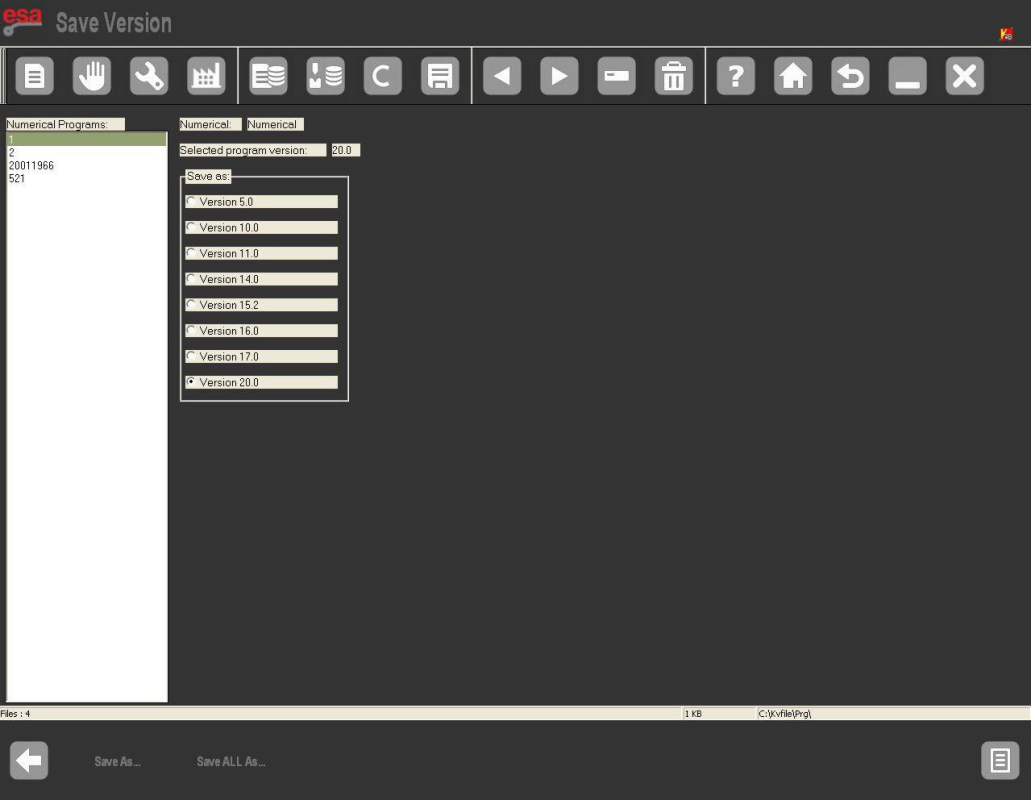
Through this interface, operators can easily manage version conversion and program storage using the ESA S875 saving programmes function.
How to Save a Numeric Programme Using ESA S875 Saving Programmes
Saving a single program in a different version format is a straightforward process when using the ESA S875 saving programmes feature.
Step 1: Open the Programme List
Press the corresponding key on the controller to enter the Programme List Mask. This screen displays all numeric bending programs stored in the machine memory.
Step 2: Enter the Saving Version Interface
Press the function key [Save Version] to open the Version Saving Mask. This is where the ESA S875 saving programmes process begins.
Step 3: Select the Programme and Target Version
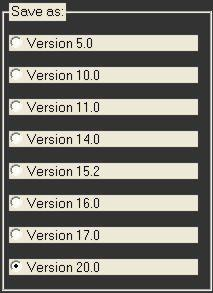
Using the touch interface, select the programme you want to convert. Then choose the version format in which the program will be saved. For example, you may choose Version 20.0 or another compatible format depending on system requirements.
After selecting the program and version format, press ENTER to confirm the selection.
Step 4: Save the Programme
Press the function key [Save As…]. A window will appear prompting you to enter a name for the new programme file.
After entering the desired name:
- Move the cursor to [Confirm]
- Press ENTER
The controller will then complete the ESA S875 saving programmes process and store the new file in the selected version format.
How to Save All Programmes Using ESA S875 Saving Programmes
In many production environments, operators may need to convert or back up multiple bending programs at once. The ESA S875 saving programmes function also allows saving all programs in the directory simultaneously.
Step 1: Access the Programme List
Press the key to open the Programme List Mask, where all stored programs are displayed.
Step 2: Open the Saving Version Mask
Press the function key [Save Version] to access the version conversion interface used in the ESA S875 saving programmes process.
Step 3: Select the Target Version Format
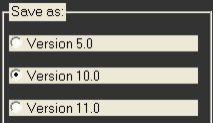
Use the touch interface to select the version format in which the programmes will be saved. For example, you may select Version 10.0 if compatibility with older controllers is required.
Press ENTER to confirm the selected format.
Step 4: Insert an External Storage Device
Insert a formatted USB device with sufficient storage space into the controller’s USB port. This device will store the converted programmes.
Step 5: Save All Programmes
Press the function key [Save ALL As…]. The system will automatically convert and save every programme in the directory using the selected version format.
Once completed, all programmes will be safely stored on the external device.
Best Practices for ESA S875 Saving Programmes Management
To ensure smooth operation and avoid compatibility issues, it is recommended to follow several best practices when using the ESA S875 saving programmes function.
First, always verify the target controller version before converting programmes. Saving files in the correct format ensures they can be opened and edited on the destination machine.
Second, regularly create backups of important bending programmes using external storage devices such as USB drives. This protects production data from accidental deletion or system failure.
Third, maintain organized naming conventions when saving programs. Clear file names make it easier to identify program versions and production batches when managing large program libraries.
Finally, periodically review stored programs and remove outdated versions to keep the working directory organized and efficient.
By properly using the ESA S875 saving programmes feature, operators can ensure safe program storage, maintain compatibility across different controller versions, and simplify production data management in modern press brake operations.
Frequently Asked Questions (FAQ)
Why can’t I find my saved programme after powering off the machine?
If you cannot locate your programme after restarting, it likely was not properly saved during the ESA S875 saving programmes process. Always ensure you complete the saving procedure by confirming the program name and pressing [Confirm] before exiting. Unsaved changes are temporary and will be lost during power-off. For critical programs, consider using the USB backup feature as an extra precaution.
What happens if I forget to save before exiting?
If you exit the programming interface without completing the ESA S875 saving programmes process, any modifications made since the last save will be lost. The ESA S875 does not automatically prompt you to save when exiting. Developing a habit of manually saving after each program modification is the best way to prevent data loss.
What is the difference between saving and backing up programmes?
Saving refers to storing a programme in the internal NC memory during the ESA S875 saving programmes process, while backing up means exporting programs to an external USB device for safekeeping. Regular backups protect against data loss from memory corruption or unexpected power failures and allow program transfer between different HARSLE machines equipped with ESA S875 controls.
Conclusion
Proper understanding of the ESA S875 saving programmes process is essential to protect your valuable bending programs and maintain efficient production workflows. By following the guidelines in this article—saving regularly after modifications, using descriptive names, creating USB backups, and organizing your program library—you can minimize downtime, prevent data loss, and improve overall shop floor efficiency.
For more detailed support on program management, backup strategies, or any other questions about your HARSLE press brake equipped with ESA S875 control, don’t hesitate to contact our technical support team. We’re here to help you get the most from your equipment and ensure your production runs smoothly every day.


