


CybTouch 8 Production Management provides a set of features that help operators organize production tasks, improve manufacturing efficiency, and reduce downtime during daily press brake operations. By using functions such as the Next Part Function, Cycles and Quantities, and VisiTouch Offline integration, operators can manage batch production more effectively, monitor production progress, and transfer programs seamlessly between offline programming software and the machine controller. In this guide, I will explain how to master CybTouch 8 Production Management, optimize production workflows, and improve overall productivity with the CybTouch 8 controller.
Understanding CybTouch 8 Production Management
The CybTouch 8 Production Management functions are designed to assist operators after a bending program has been created and verified. Rather than focusing on programming individual bends, these features help organize production, manage repetitive manufacturing tasks, and improve communication between programming and machine operation.
Production management tools become particularly valuable during batch manufacturing, where the same program may be executed hundreds or even thousands of times. By reducing unnecessary manual operations and improving program organization, operators can maintain higher productivity while minimizing production errors.
The production management functions discussed in this guide include the Next Part Function, Cycles and Quantities, and VisiTouch Offline program transfer.
Using the Next Part Function
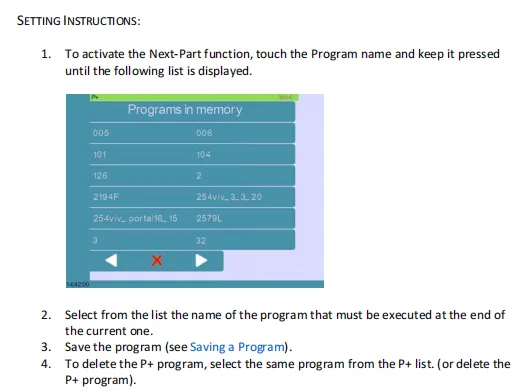
The Next Part Function allows operators to continue production more efficiently by preparing the controller for the next programmed workpiece once the current part has been completed.
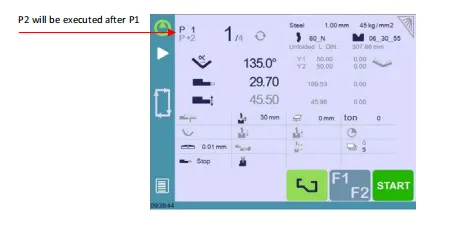
Instead of manually returning to the program list after every finished component, operators can quickly move to the next production task, reducing downtime between jobs.
This function is especially useful in production environments where multiple part programs are processed consecutively during the same shift.
Typical benefits include:
- Faster transition between production jobs.
- Reduced operator intervention.
- Improved workflow during batch production.
- Better overall machine utilization.
Managing Cycles and Quantities
Monitoring production quantities is an important part of CybTouch 8 Production Management.
The controller allows operators to define production quantities and monitor the progress of each manufacturing job throughout the production cycle.

Depending on the application, production information may include:
- Required production quantity.
- Completed parts.
- Remaining quantity.
- Current production cycle.
- Cycle progress.
By monitoring these values in real time, operators can easily determine how many components have already been produced and how many remain to be completed.
This information also helps production supervisors monitor manufacturing progress without manually counting finished workpieces.
Importing Programs from VisiTouch Offline
VisiTouch Offline provides an efficient way to prepare bending programs on a computer before transferring them to the CybTouch 8 controller.
Offline programming reduces machine downtime because programs can be created, reviewed, and optimized without occupying the press brake.
After the program has been completed, it can be transferred to the controller using the supported transfer method, allowing operators to begin production immediately.
Using offline programming offers several advantages:
- Reduced machine setup time.
- Faster program preparation.
- Easier program modification.
- Improved production planning.
- Better collaboration between programming and machine operation.
This workflow is particularly beneficial for manufacturers managing multiple production orders or frequently changing workpiece designs.
Improving Production Efficiency
By combining all production management features, operators can establish a more organized manufacturing workflow.
For example, bending programs can be prepared offline, transferred to the controller before production begins, monitored through production quantity functions during manufacturing, and followed immediately by the next scheduled part using the Next Part Function.
This integrated workflow reduces idle machine time, minimizes operator input, and helps maintain stable production throughout the entire manufacturing process.
For facilities producing large volumes of sheet metal components, effective use of CybTouch 8 Production Management can contribute to higher productivity, improved consistency, and more efficient production scheduling.
Best Practices for CybTouch 8 Production Management
To maximize production efficiency, operators should follow several recommended practices when using CybTouch 8 Production Management.
- Verify the bending program before starting batch production.
- Set the correct production quantity before beginning a manufacturing run.
- Monitor completed and remaining quantities regularly.
- Prepare programs offline whenever possible to reduce machine downtime.
- Transfer verified programs to the controller before production starts.
- Organize production jobs logically to minimize unnecessary setup changes.
- Save updated programs after production if modifications have been made.
Following these practices helps improve workflow efficiency, reduce production interruptions, and ensure consistent manufacturing performance across multiple production orders.
Frequently Asked Questions(FAQ)
Does CybTouch 8 automatically count completed parts?
The controller can manage production quantities and update the relevant counters as the programmed cycles are completed. Operators should still verify that the production quantity has been configured correctly before starting the batch.
What should I verify after importing an offline program?
Before production, verify the material, thickness, tooling, bending sequence, axis positions, production quantity, and any correction values. The imported program should also be checked against the actual machine configuration.
What should I verify after importing an offline program?
Before production, verify the material, thickness, tooling, bending sequence, axis positions, production quantity, and any correction values. The imported program should also be checked against the actual machine configuration.
Conclusion
The CybTouch 8 Production Management functions help operators organize bending jobs, monitor production quantities, and reduce unnecessary downtime between different parts. By using the Next Part Function, Cycles and Quantities, and VisiTouch Offline together, manufacturers can establish a more structured and efficient production workflow.
The Next Part Function supports faster transitions between jobs, while production counters provide clearer control over completed and remaining quantities. VisiTouch Offline further improves efficiency by allowing programs to be prepared before the press brake is required for production.
To achieve reliable results, operators should always verify imported programs, confirm the required production quantity, and review the machine setup before beginning a batch. Mastering CybTouch 8 Production Management can improve machine utilization, reduce production interruptions, and support more consistent sheet metal manufacturing.


