


ESTUN E315P Status Monitoring allows operators and technicians to observe the real-time status of controller input and output ports during press brake operation. Instead of manually activating signals for diagnostic testing, users can monitor how the existing I/O signals change while the machine performs its normal functions.
The E315P provides Port Monitoring directly through the Programming interface. From this page, users can view both input and output status and compare the controller indication with the actual machine operation.
This function is particularly useful for understanding the current control status and observing whether the expected signals change during different operating conditions. This guide explains what ESTUN E315P Status Monitoring is, how to access it, and how to interpret the displayed I/O information.
What Is ESTUN E315P Status Monitoring?
Status Monitoring is a real-time observation function built into the E315P controller.
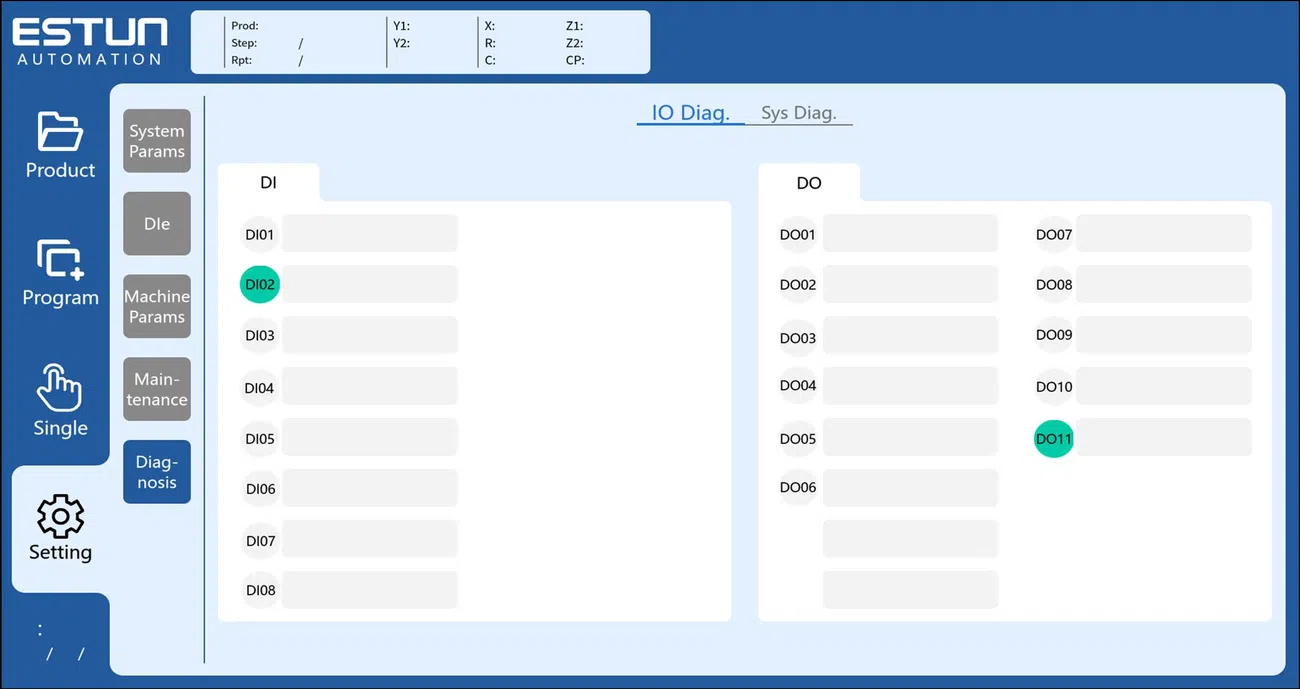
It allows users to monitor the current state of digital input and output ports without leaving the Programming interface. The controller displays the status of individual I/O signals, allowing technicians to see whether each signal is currently active or inactive.
The monitoring interface is divided into two main areas:
- Input Status Monitoring
- Output Status Monitoring
This separation makes it easier to determine whether the signal being observed comes from an external input device or is generated as an output command by the controller.
Unlike active diagnostic testing, ESTUN E315P Status Monitoring primarily focuses on observing the current machine status.
How to Access Status Monitoring
The Status Monitoring function can be accessed from the E315P Programming interface.
Open the Programming page and select the Port Monitoring icon. The controller then opens the Port Monitoring interface.
From this screen, users can switch between or view the corresponding input and output status information.
Because Port Monitoring is available from the Programming interface, it provides a convenient way to observe signals while checking machine operation or analyzing a particular control sequence.
There is no need to manually activate an output simply to observe its current logical state.
What Is Input Status Monitoring?
Input Status Monitoring displays the current condition of signals entering the E315P controller.
These inputs can represent signals generated by switches, sensors, relays, or other components connected to the controller.
When an external input changes state, the corresponding indication on the monitoring interface should also change.
This creates a simple signal path:
External device → Input signal → E315P → Port Monitoring display
By observing this relationship, technicians can determine whether the controller recognizes a signal during machine operation.
For example, if a particular machine action should trigger an input, the operator can monitor the corresponding port and observe whether its status changes at the expected time.
What Is Output Status Monitoring?
Output Status Monitoring displays the current state of signals sent from the E315P controller to external circuits or machine components.
The signal path is essentially the opposite of an input:
E315P → Output signal → External circuit or component
During machine operation, the controller changes output states according to the programmed sequence and control logic.
The Port Monitoring interface allows technicians to observe these changes in real time.
This is useful when checking whether the controller generates the expected output during a particular operating stage. If the output status changes on the interface, technicians know that the corresponding controller output command has become active.
However, the displayed output status alone does not confirm that the external component has physically operated. The actual machine response should also be observed when troubleshooting.
How to Read Port Status During Machine Operation
The main advantage of ESTUN E315P Status Monitoring is that signals can be observed while the machine control sequence is taking place.
Before monitoring, identify the port associated with the function being checked. Using the machine’s electrical information can help confirm which input or output corresponds to the target signal.
Then operate the machine under the required condition and observe the relevant port.
For an input, check whether the displayed state changes when the external signal is activated.
For an output, check whether the controller changes the output status at the expected point in the operating sequence.
Rather than watching every port simultaneously, focusing on the signals directly related to the function being checked makes the monitoring process easier to interpret.
How Is Status Monitoring Different From I/O Diagnostics?
Although ESTUN E315P Status Monitoring and I/O Diagnostics both display information about controller ports, they serve different purposes.
Status Monitoring is mainly observational. It allows users to see how input and output states change during machine operation.
I/O Diagnostics is mainly used for active testing. Technicians can operate input devices or manually change output states to verify wiring and signal response.
This distinction is important during troubleshooting.
If the goal is to observe whether a signal appears during a normal operating sequence, Status Monitoring is the more appropriate starting point.
If a particular input or output then requires dedicated testing, the I/O Diagnostics interface can be used for further investigation.
How Can Status Monitoring Help With Troubleshooting?
Status Monitoring can help technicians narrow down where an abnormal machine response begins.
Suppose a machine function should occur after a particular input becomes active. By observing the corresponding input port, technicians can first determine whether the controller receives that signal.
If the expected input appears but the next machine action does not occur, further investigation can focus on the related control conditions or output side.
Similarly, if an expected output never becomes active during the relevant operating stage, the technician knows that the problem should not immediately be treated as an external relay or actuator failure.
In this way, ESTUN E315P Status Monitoring provides useful real-time information before more detailed diagnostic testing is performed.
Using ESTUN E315P Status Monitoring Effectively
Effective monitoring depends on understanding which signal should change and when it should change.
Before checking the interface, identify the target input or output and understand its role in the machine sequence. Then observe both the controller indication and actual machine behavior.
Status Monitoring should be used as an observation tool rather than as a substitute for electrical measurement or dedicated diagnostic testing.
When a suspicious signal is identified, technicians can continue troubleshooting with I/O Diagnostics, System Diagnostics, the electrical diagram, or appropriate measuring equipment as required.
Used in this way, ESTUN E315P Status Monitoring provides a convenient first step for understanding real-time controller behavior and locating abnormal I/O conditions during press brake operation.
Frequently Asked Questions(FAQ)
Does an Active Output Mean the Connected Component Is Working?
Not necessarily. An active output on the Port Monitoring page indicates the controller’s output status, but it does not confirm that the external relay, valve, or other connected component has physically responded. If the output is active but the machine does not respond, the downstream electrical circuit and component should be inspected.
What If the Input Changes Normally but the Expected Output Does Not?
This indicates that the controller is detecting the monitored input, but further investigation is required before determining why the expected output is not activated. Check the relevant operating conditions and control sequence rather than immediately replacing the input device.
Should Port Monitoring Be Used as the Only Troubleshooting Method?
No. ESTUN E315P Status Monitoring is useful for identifying abnormal signal behavior, but it should be combined with the machine’s electrical diagram, I/O Diagnostics, System Diagnostics, and appropriate electrical measurements when further verification is required.
Conclusion
ESTUN E315P Status Monitoring provides a convenient way to observe input and output signals in real time through the Programming interface. By opening Port Monitoring, technicians can check whether expected I/O states change during different stages of machine operation.
The function is particularly useful as an initial troubleshooting tool. It can help determine whether an expected input reaches the controller and whether the corresponding output status is generated. When an abnormal signal is identified, technicians can then use more specific diagnostic methods to investigate further.
By combining ESTUN E315P Status Monitoring with the electrical diagram and dedicated diagnostic functions, technicians can analyze controller behavior more systematically and locate I/O-related problems more efficiently.


