


The ESTUN E315P LDP Enable parameter determines which control signal triggers the pressure-holding stage during press brake operation. Proper configuration helps ensure that the controller follows the intended bending sequence and responds to the appropriate machine signals.
According to the ESTUN E315P operating manual, this parameter allows operators to select between the Speed Change Signal and the Lower Dead Point Signal as the triggering condition for pressure holding.
This guide explains how LDP Enable works, how to configure the parameter, and how to verify the relevant signals during press brake operation.
What Is ESTUN E315P LDP Enable?
The ESTUN E315P LDP Enable is a system parameter associated with the activation of the pressure-holding stage.
LDP stands for Lower Dead Point, referring to the lower dead point of the press brake ram.
The parameter is located in the controller’s C.2 System Parameters section.
According to the operating manual, its specifications are as follows:
| Parameter | Specification |
|---|---|
| Parameter Name | LDP Enable |
| Default Value | Disable |
| Available Options | Enable / Disable |
| Disable | Uses the Speed Change Signal OFF-to-ON transition |
| Enable | Uses the Lower Dead Point Signal OFF-to-ON transition |
| Function | Selects the triggering signal for pressure holding |
The default setting is Disable.
This means that the controller uses the Speed Change Signal transition as the relevant pressure-holding trigger under the documented configuration.
Enabling LDP changes the selected triggering signal to the Lower Dead Point Signal.
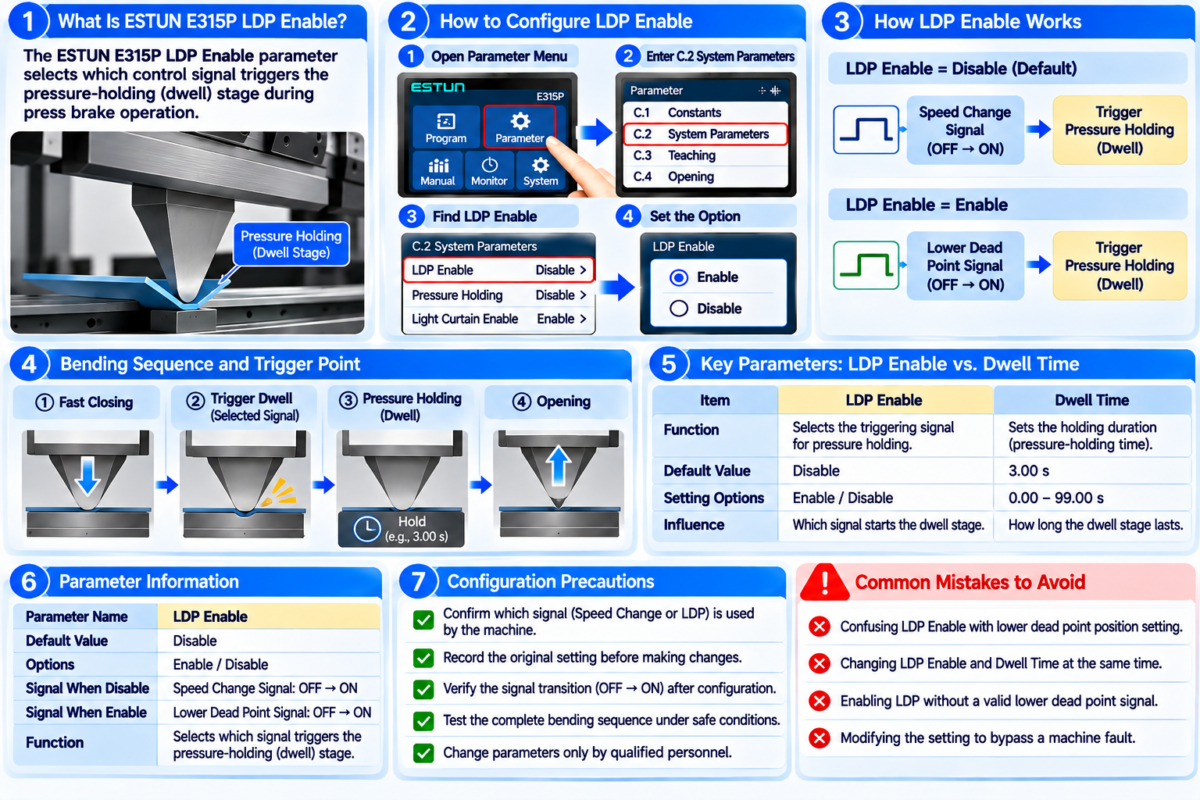
How Does ESTUN E315P LDP Enable Work?
The ESTUN E315P LDP Enable determines which signal transition the controller uses to initiate the pressure-holding stage.
The manual describes two operating configurations.
LDP Enable: Disable
When LDP Enable is set to Disable, the controller uses the Speed Change Signal.
The relevant triggering condition is:
Speed Change Signal: OFF → ON
When the specified signal transition occurs under the applicable operating conditions, the controller uses it as the trigger for pressure holding.
This is the default configuration described in the manual.
LDP Enable: Enable
When LDP Enable is set to Enable, the controller uses the Lower Dead Point Signal instead.
The relevant triggering condition becomes:
Lower Dead Point Signal: OFF → ON
This configuration selects the LDP signal transition as the trigger for the pressure-holding stage.
The appropriate option depends on the machine’s electrical configuration and intended control logic.
Operators should not assume that enabling LDP automatically improves bending accuracy or changes the physical lower dead point position.
How to Configure ESTUN E315P LDP Enable
The ESTUN E315P LDP Enable should be configured according to the machine manufacturer’s approved settings.
Step 1: Access System Parameters
Open the controller’s parameter settings.
Locate the C.2 System Parameters section described in the ESTUN E315P operating manual.
Find the parameter labeled LDP Enable.
Step 2: Check the Existing Setting
Review whether the parameter is currently set to Enable or Disable.
The factory default is Disable.
Before making changes, record the existing configuration and confirm which signal is used by the machine.
Step 3: Select the Required Option
Choose the setting that corresponds to the machine’s intended control arrangement.
Select Disable when the approved configuration requires the Speed Change Signal transition.
Select Enable when the approved configuration requires the Lower Dead Point Signal transition.
Do not change the setting solely to eliminate an unexpected machine alarm or bypass an unresolved signal problem.
Step 4: Verify the Signal Response
After configuring the ESTUN E315P LDP Enable, qualified personnel should verify the relevant input signal using the controller’s available diagnostic functions.
Confirm that the selected signal changes state under the expected operating conditions.
Step 5: Check the Bending Sequence
Perform a controlled operational test according to the machine manufacturer’s commissioning procedures.
Verify that the controller follows the intended sequence and that the pressure-holding stage is activated under the correct conditions.
LDP Enable vs. Dwell Time
Although both parameters relate to pressure holding, they perform different functions.
The ESTUN E315P LDP Enable selects the triggering signal, while Dwell Time determines the programmed holding duration.
| Parameter | LDP Enable | Default Dwell Time |
|---|---|---|
| Main Function | Selects pressure-holding trigger | Sets holding duration |
| Default Value | Disable | 3.00 s |
| Available Settings | Enable / Disable | 0.00–99.00 s |
| Main Purpose | Signal selection | Timing control |
For example, changing LDP Enable does not directly increase or decrease the programmed holding duration.
Similarly, changing Dwell Time does not select a different triggering signal.
Both parameters should be understood independently when reviewing the machine’s bending sequence.
How to Verify LDP Signal Operation
The ESTUN E315P controller provides diagnostic functions that can assist qualified personnel in checking relevant input signals.
When evaluating the ESTUN E315P LDP Enable, signal verification should focus on the selected triggering condition.
Check the Signal Status
Use the appropriate controller diagnostic or status-monitoring interface to observe the relevant input signal, where available.
Confirm that the signal state corresponds to the machine’s actual operating condition.
Verify the OFF-to-ON Transition
The manual specifies an OFF-to-ON transition for both available triggering signals.
Therefore, simply observing an ON state may not be sufficient to establish that the expected transition occurred.
Confirm the Selected Signal
When LDP Enable is disabled, verify the Speed Change Signal.
When LDP Enable is enabled, verify the Lower Dead Point Signal.
Review the Operating Sequence
Check whether the pressure-holding stage is initiated under the intended conditions.
If the sequence is abnormal, investigate the signal source, electrical connections, and related control parameters before making further adjustments.
Common LDP Enable Configuration Mistakes
Several mistakes should be avoided when configuring the ESTUN E315P LDP Enable.
Confusing LDP with Physical Position Adjustment
LDP Enable selects a triggering signal. It does not directly set the mechanical lower dead point or calibrate the ram position.
Selecting an Unsupported Signal
Enabling LDP without confirming that the machine provides the required signal may result in an unsuitable operating configuration.
Always verify the electrical design before changing the parameter.
Ignoring Signal Transition Direction
The manual specifies an OFF-to-ON transition.
Incorrect assumptions about signal behavior can lead to confusion during commissioning and troubleshooting.
Changing Multiple Parameters Simultaneously
Adjusting LDP Enable, Dwell Time, and unrelated system parameters at the same time can make fault identification more difficult.
Configuration changes should be controlled and documented.
Practical Recommendations for Reliable LDP Configuration
Before adjusting the ESTUN E315P LDP Enable, review the machine’s electrical documentation and existing controller settings.
Confirm which triggering signal is required by the approved machine configuration.
Record the original parameter value and verify the relevant input through the controller’s diagnostic functions.
After any change, check the complete bending sequence under safe operating conditions.
If the machine behaves unexpectedly, stop testing and investigate the cause rather than repeatedly switching between Enable and Disable.
Proper configuration of the ESTUN E315P LDP Enable helps maintain the intended pressure-holding trigger logic and supports consistent press brake operation.
Frequently Asked Questions(FAQ)
Does Enabling LDP Change the Lower Dead Point Position?
No. The ESTUN E315P LDP Enable parameter selects the signal used to trigger pressure holding. It does not directly adjust the physical lower dead point position or calibrate the ram’s movement.
Can LDP Enable Improve Bending Accuracy?
Not directly. LDP Enable controls signal selection rather than bending angle compensation. Bending accuracy depends on factors such as tooling, material properties, programmed parameters, and machine calibration. The appropriate LDP setting should match the machine’s intended control logic.
Is the Speed Change Signal the Same as the Lower Dead Point Signal?
No. These are different control signals. The Speed Change Signal is associated with the machine’s movement-stage transition, while the Lower Dead Point Signal indicates a defined lower-position condition. The controller uses one of these signals as the pressure-holding trigger according to the selected LDP Enable setting.
Conclusion
The ESTUN E315P LDP Enable is an important system parameter that determines which control signal triggers the pressure-holding stage during press brake operation.
According to the ESTUN E315P operating manual, the default setting is Disable, which uses the Speed Change Signal OFF-to-ON transition. When enabled, the controller uses the Lower Dead Point Signal OFF-to-ON transition instead.
Operators should understand that LDP Enable controls signal selection rather than lower dead point positioning or dwell duration. Correct configuration depends on the machine’s electrical design and intended operating sequence.
Before changing the ESTUN E315P LDP Enable, qualified personnel should verify the relevant signals, record the existing setting, and follow the manufacturer’s commissioning procedures.
Proper configuration and signal verification help maintain consistent pressure-holding activation and reliable press brake operation.


